I installed Chamberlain’s MyQ app so I could use the “smart” features of the GDO’s and I was completely underwhelmed.
The functionality of the app is exactly the same as the functionality of the one button remote. I can’t even use the remote to turn on the lights.
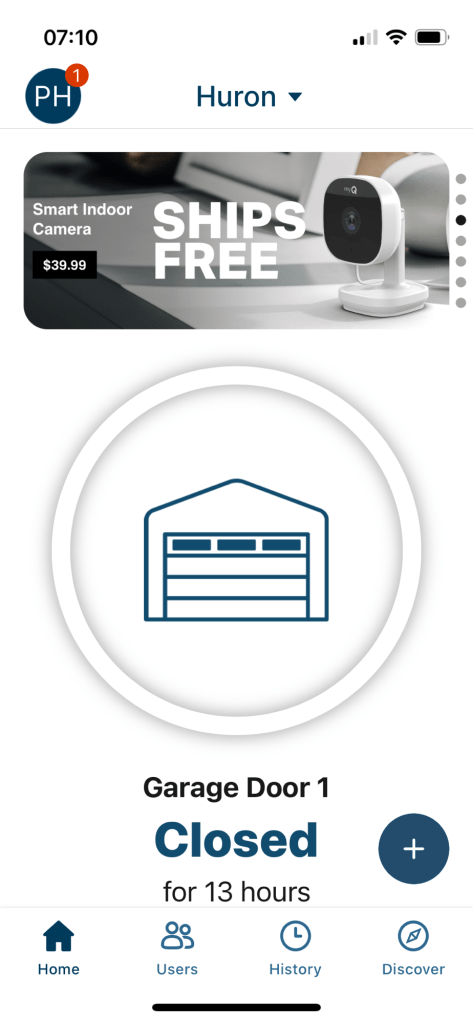
Actually, the primary function of the app appears to be to sell more services & products.
Every time I open the app I have to click through an advertisement-
- Amazon and Walmart both want to deliver inside my garage. As if I’ll let random gig workers into my house unsupervised.
- Chamberlain wants to sell me cameras, that also don’t speak to HomeKit. (More on this later.)
- Yale wants to sell locks, some of which do talk to HomeKit.
- The ads take up a tile on the top of the screen

But the worst part of this app for me, is that it won’t speak to HomeKit. I don’t see any integration with any other smart home platforms either. I don’t see Google Home or Amazon Alexa.
The omission of Alexa is especially striking given that Chamberlain does allow users to sign up for Amazon’s in-garage delivery service.
And the GDO can see HomeKit, it offered to act as a hub for the two Meross devices which had been physically uninstalled for about six hours prior to firing up MyQ. The only way MyQ could know that these devices existed was by querying HomeKit.
If I could see the GDO’s status on the same screen where I check my door locks and doorbell camera, I would be completely satisfied.
My normal use of manufacturer apps is to use them just for initial setup and firmware updates. My regular usage is strictly through Apple Home.
More importantly, my wife and mother can’t be bothered to have (at current count) 19 separate apps to run the house.
Once the app was installed, setup was quite simple.
- Press learn button on wall control.
- Connect to GDO over Bluetooth.
- Enter WiFi credentials.
- Wait for GDO to go through a series of beeps and blinking lights.
- Done
Given the lack of HomeKit integration, I’ve added a RATgdo board between the low voltage wiring and the GDO itself.
RATgdo is an acronym for Rage Against The Garage Door Opener.
The RATgdo is a bare circuit board, it feels wrong to just let it hang naked in my dusty garage. Thingverse and the FreeD printer to the rescue.
Of course the first model I downloaded didn’t fit the hardware version I had, so I had to do it a second time.
Pro tip – add the RATgdo boards to the HomeKit environment at the same time you flash the board, especially when you have more than one.
While Chamberlain only allows me to open and close the door through the official app, the RATgdo board makes the door, light, and motion sensor each individually addressable through HomeKit.

So now I’ve got HomeKit control over the garage doors and the lights.

 Modern Anachronist